
The SEO Chrome extension that audits any page without leaving the tab.
Open it on any page and see what a crawler sees: the on-page issues, the heading outline, every link and its rel attributes, and the structured data, read straight from the page in front of you. Free, and it works on competitors too.
Version 1.2.3 · Free to install · No account needed for the on-page tools
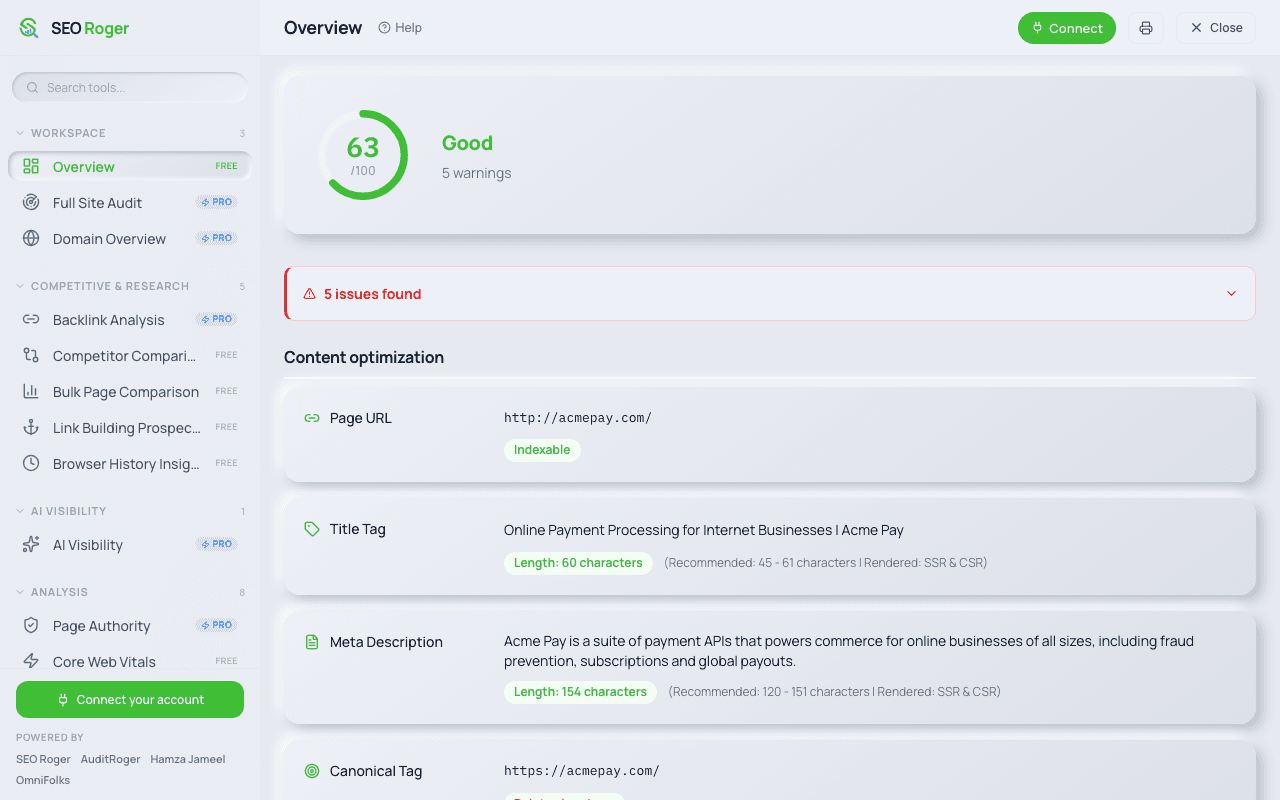
The actual panel, on a real page
These are the screenshots from the Chrome Web Store listing, not mockups. Numbers and issue text are whatever the extension found on the page being audited.
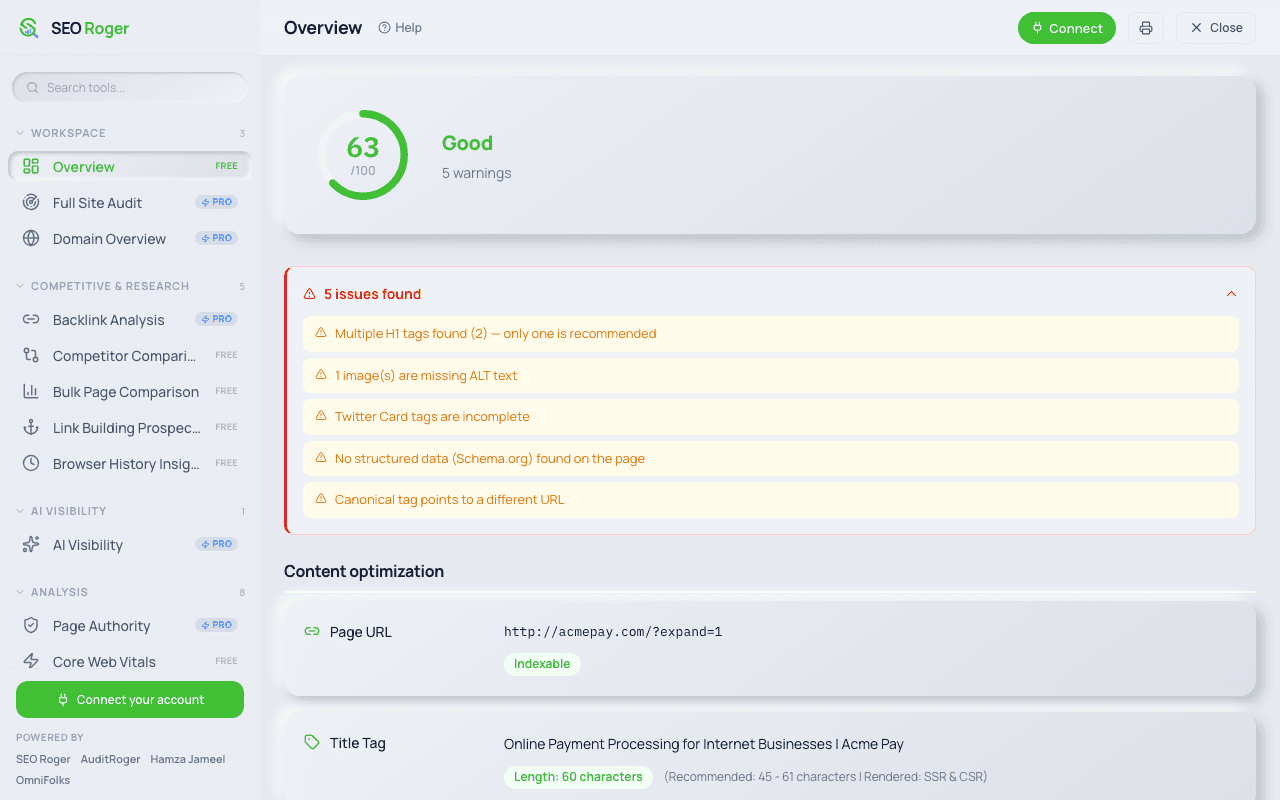
Issues named, not counted
Expanding the banner lists each problem in plain words: two H1 tags where one is recommended, an image with no ALT text, incomplete Twitter Card tags, no structured data, and a canonical pointing somewhere else. Each is specific enough to act on without opening devtools.
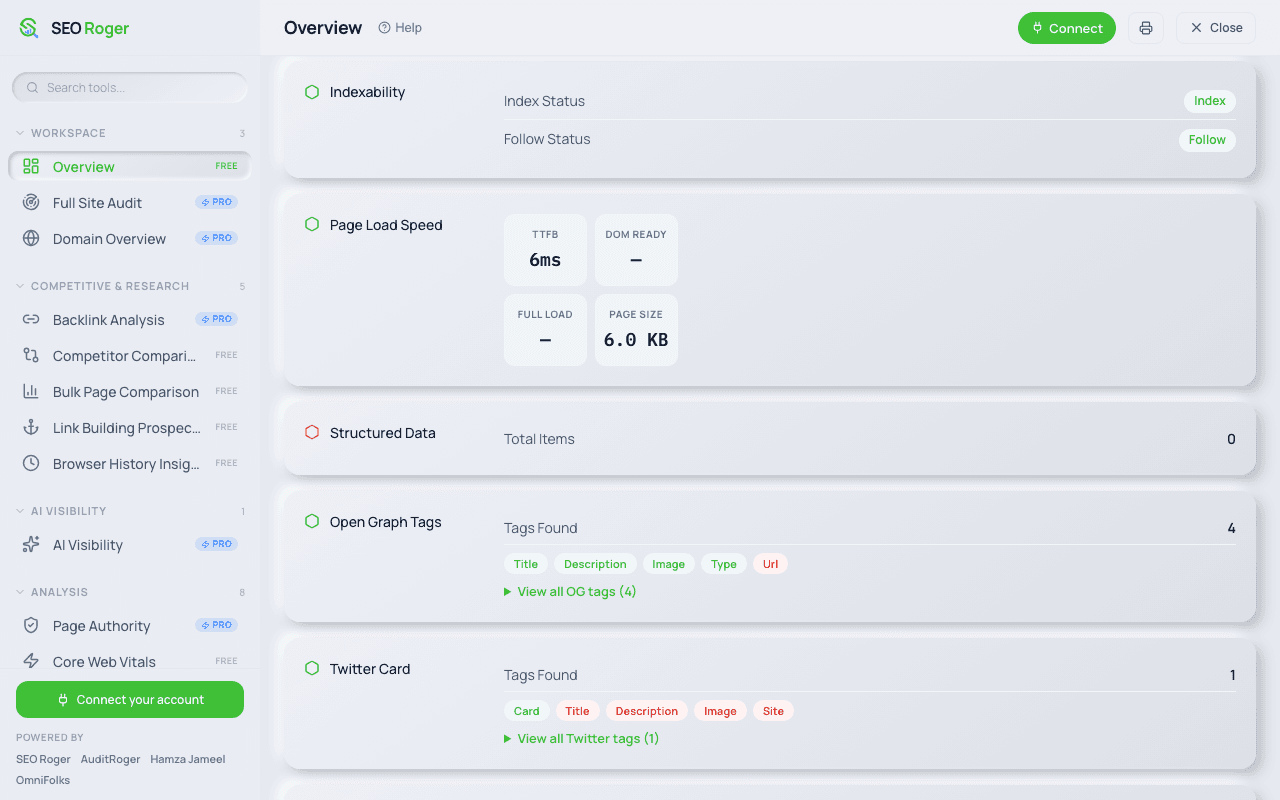
The technical read of the page
Further down the same overview: index and follow status, TTFB and page weight, how many structured-data items were found, and which Open Graph and Twitter tags exist. Missing tags are flagged in red, so an incomplete social card is obvious at a glance.
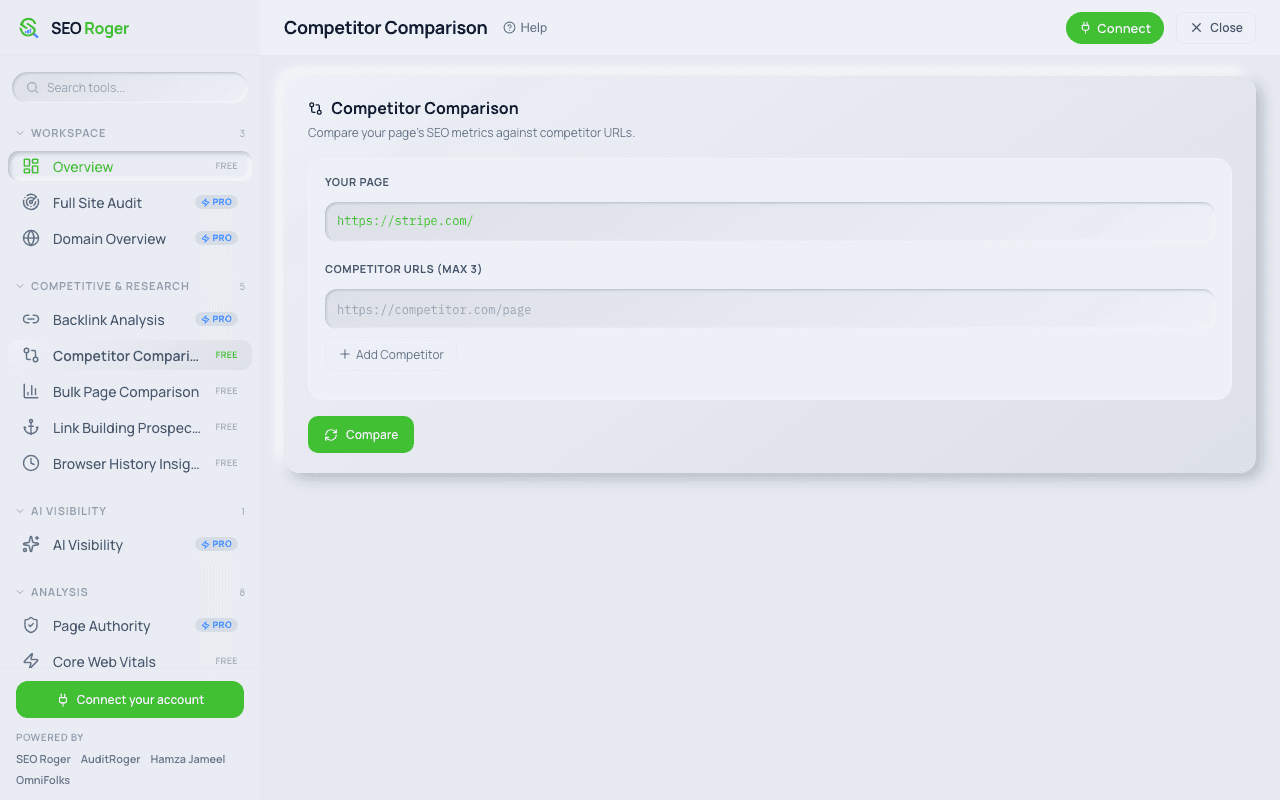
Compare against whoever outranks you
Competitor Comparison pre-fills the page you are on and takes up to three rival URLs. It reads their public source exactly the way it reads yours, so the page beating you is just as inspectable. Free, and no account needed.
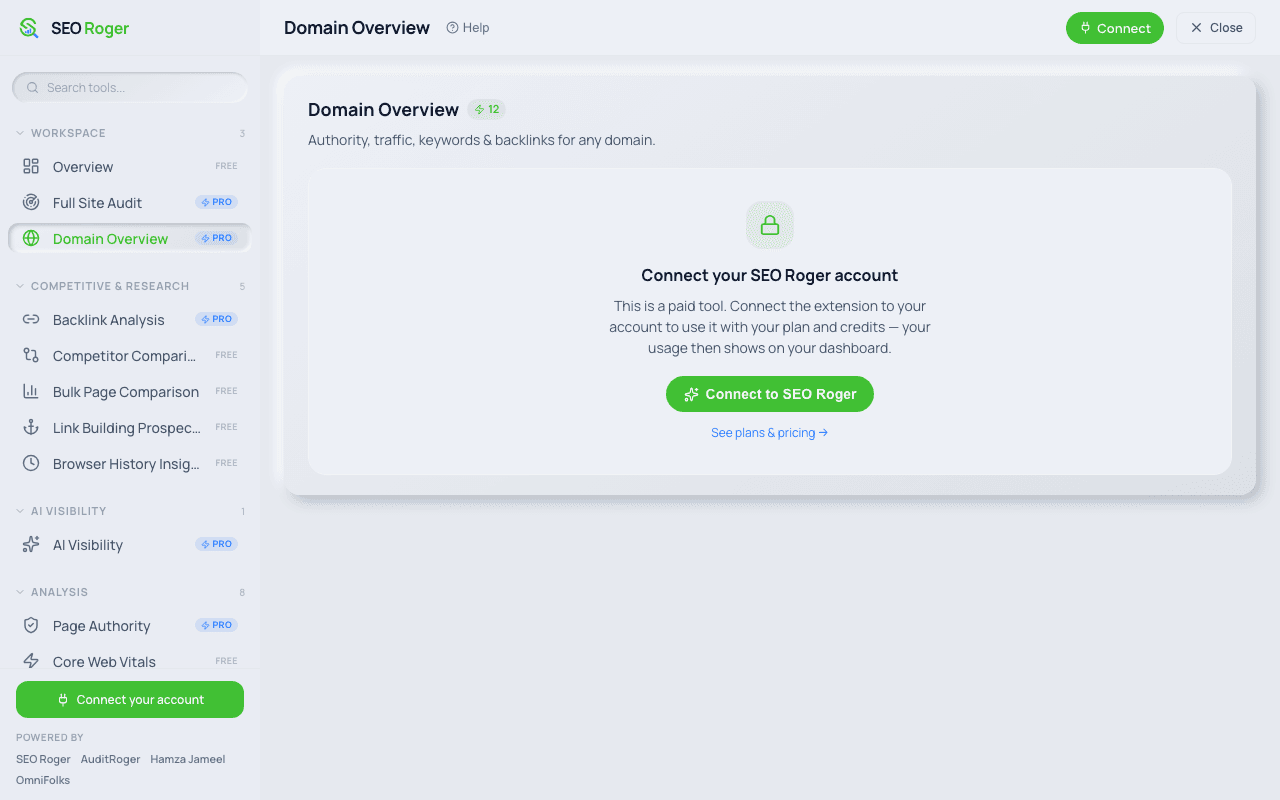
Paid tools draw on your existing balance
The heavier tools show their credit cost up front, 12 for Domain Overview, and ask you to connect an account once. They then spend from the same balance as the dashboard rather than a separate one, and the usage shows up in your normal history.
Everything the extension ships with
33 run entirely on the page already open in your browser, so they are free and need no account. The other 9 pull live third-party data and spend credits from your plan.
Workspace
- OverviewFree
- Full Site AuditPro
- Domain OverviewPro
Competitive & research
- Backlink AnalysisPro
- Competitor ComparisonFree
- Bulk Page ComparisonFree
- Link Building ProspectsFree
- Browser History InsightsFree
AI visibility
- AI VisibilityPro
Analysis
- Page AuthorityPro
- Core Web VitalsFree
- Image OptimizationFree
- Heading OptimizationFree
- PageSpeed InsightsFree
- Page Pro AnalyzerFree
- Schema ValidatorFree
- Accessibility CheckerFree
SERP & rankings
- Rank CheckPro
- Search Intent FinderPro
- Rank ComparisonPro
- SERP SimulatorFree
Technical SEO
- Link CheckerFree
- Broken LinksFree
- Redirects ManagerFree
- IndexAPI ConnectorFree
- Structured DataFree
- Robots.txt GeneratorFree
- .htaccess GeneratorFree
- Thin Content FinderFree
- Hreflang CheckerFree
- Sitemap DownloaderFree
- Sitemap Visual MapFree
Content & keywords
- Keyword VolumePro
- Keyword DensityFree
- Word CounterFree
- Meta Tags StudioFree
- Meta Tag PlacementFree
- Social MarkupFree
Tools & utilities
- HTML CleanerFree
- Page ExtractorFree
- Rendered SourceFree
Reports
- PDF ExportFree
Pro tools spend the same credits as the dashboard. Connecting an account is one click and does not create a second balance.
Everything on the page, without the source view
These run entirely on the page already open in your browser, which is why they are free and need no account.
On-page audit
A score for the page you are looking at, with the specific issues behind it: title and description length, missing alt text, canonical problems and thin content.
Heading structure
The full H1 to H6 outline exactly as a crawler reads it, so you can see skipped levels and headings used for size rather than structure.
Schema viewer
Every block of structured data on the page, parsed and readable, instead of hunting through the source for a script tag.
Link inspector
Each link on the page with its anchor text, whether it is internal or external, and whether it carries nofollow, sponsored or ugc.
Meta and social tags
Title, description, canonical, robots directives and the Open Graph and Twitter tags that decide how the page looks when shared.
Competitor pages too
It reads whatever page is open, so the page outranking you is as inspectable as your own. All of it is public information in the source.
Installed and useful in about a minute
Install from the Chrome Web Store
One click, no account required. The free on-page tools work immediately on any page you open.
Connect your account (optional)
If you have a SEO Roger account, connect it once from the extension. That unlocks the tools that pull live data, and they spend credits from the same balance as the dashboard.
Audit as you browse
Open the extension on any page. It re-reads the current page every time you open it, so navigating to a new URL gives you that page rather than the last one.
On permissions. The extension requests activeTab and scripting so it can read the page you open it on, storage so your settings persist, and history for the browsing-related tools. It reads the current tab when you open the panel rather than monitoring your browsing in the background.
Common questions
Does the extension cost anything?
No. Installing it is free and the on-page tools, the audit, headings, links, schema and meta inspection, work without an account because they read the page already open in your browser. Only the tools that pull live third-party data spend credits, and those need a connected account.
Do I need a SEO Roger account to use it?
Not for the free tools. Connect an account only when you want the paid tools inside the extension, in which case they draw on the same credit balance as your dashboard rather than a separate one.
What permissions does it ask for, and why?
Four: activeTab and scripting so it can read the page you explicitly open it on, storage so your settings and account connection persist between sessions, and history for the browsing-related tools. It reads the current tab when you open it, not continuously in the background.
Does it work on any website?
It works on any normal web page, including competitors, because everything it reads is in the page source that your browser already downloaded. Chrome blocks extensions from running on its own internal pages such as the settings and new-tab screens, which is a browser restriction rather than a limitation of the extension.
Which browsers are supported?
Chrome, and the Chromium-based browsers that install from the Chrome Web Store, which includes Edge, Brave, Arc and Opera. There is no Safari or Firefox build.
Why did it show me data from the previous page?
It should not any more. Earlier versions analysed the page once when the panel first opened, so navigating without reopening could leave stale results on screen. Since 1.2.3 it re-analyses on every open and also watches for in-page navigation. If you are still seeing this, check you are on the current version.
Does it replace the dashboard?
No, they do different jobs. The extension is for inspecting one page while you are looking at it. Anything that crawls your whole site, tracks rankings over time or stores history lives in the dashboard, because that work outlives a browser tab.